
Table of Contents
EPFO 3.0 UPI Withdrawal — Finally Good News for Crores of Workers
Ok so honestly, if you have ever tried to withdraw your PF money in India, you know how frustrating that whole process used to be.
You submit the claim. Then you need to wait till that application gets processed. Then you check the portal. Then you call the EPFO helpline. Then you wait some more. Sometimes it takes 7 days. Sometimes 15 days. Sometimes you get a rejection notice and have to start all over again because your bank account details have some small mismatch.
I have personally seen many people in who need urgent money for medical emergencies, sudden job loss — sitting helplessly waiting for their own money to arrive. Money that they themselves put in, every single month of their working life.
That is why EPFO 3.0 UPI withdrawal is genuinely exciting news. And that is not just PR talk — this is a real, meaningful change that is going to help millions of salaried workers in India.
Under the new EPFO 3.0 upgrade, members will soon be able to withdraw their PF money directly via UPI and get it in their bank account almost instantly. The UPI and ATM withdrawal route is expected to go live by late May or mid-2026.
In this article I am going to break down everything you need to know about EPFO 3.0 UPI withdrawal — what it is, how it works, who can use it, what documents you need, and most importantly, what you should do right now to make sure your account is ready when it launches.
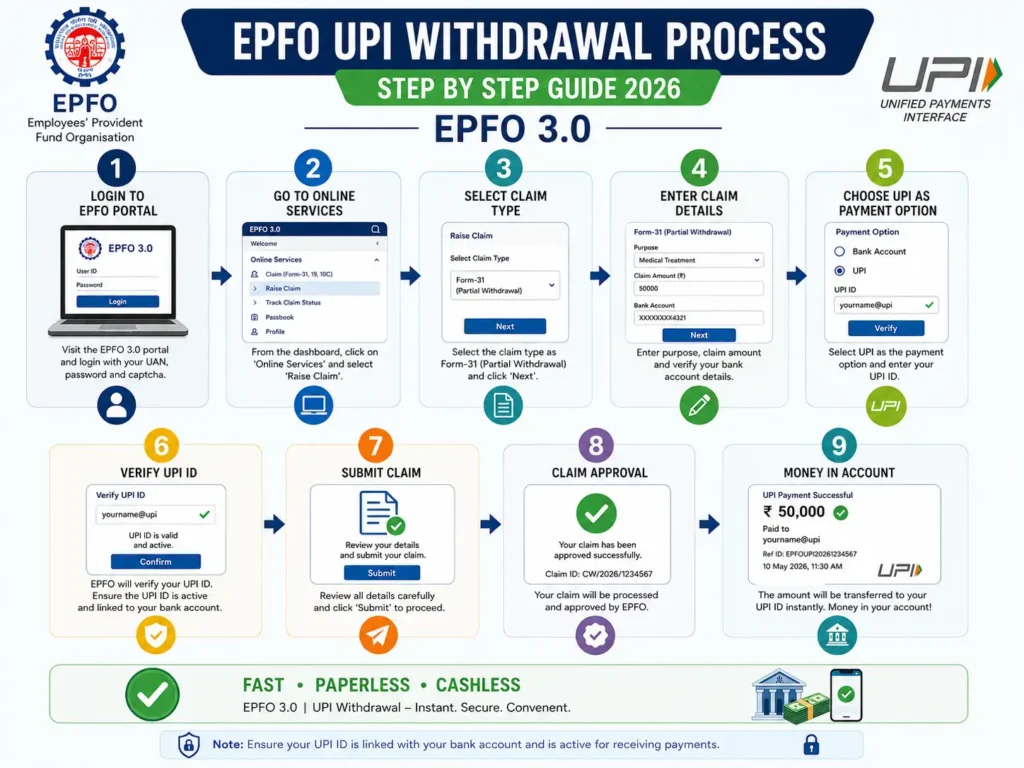
What Is EPFO 3.0 UPI Withdrawal and How Does It Work?
Let me explain this in simple language.
Right now when you want to withdraw PF money, the process goes like this:
You login to the EPFO portal → submit a claim → EPFO verifies it → money is transferred to your bank account via NEFT → you wait several days to see the credit.
With EPFO 3.0 UPI withdrawal, the process will change to something like this:
You login to the EPFO portal or UMANG app → submit a claim → choose UPI as payment method → enter your UPI ID → money gets credited to your bank account via UPI — potentially within hours or even minutes.
The big difference is UPI. UPI transactions in India are near-instant. We all use it to pay ₹20 at a chai stall or split restaurant bills. The same speed will now apply to your PF withdrawals.
EPFO is working closely with NPCI (National Payments Corporation of India) , the same body that runs UPI for all of India — to make this happen. Once it goes live, your UPI ID will be directly linked to your EPF account and withdrawals will bypass the slow traditional bank verification process.
This is a genuinely big deal. And it is coming soon.
What Is EPFO 3.0? Why Is Everyone Talking About It?
You will see “EPFO 3.0” mentioned everywhere in news articles about EPFO 3.0 UPI withdrawal. Let me quickly explain what it means.
EPFO 3.0 is the new upgraded digital platform that the Employees’ Provident Fund Organisation is building. Think of it as a complete overhaul of how EPFO operates — from a slow, paper-heavy government system to a fast, digital, automated one.
Here is what EPFO 3.0 brings:
- UPI-based PF withdrawals — withdraw directly to your UPI ID
- ATM-based withdrawals — use your UAN to withdraw PF money from bank ATMs, just like withdrawing from a savings account
- Auto-claim settlement — the system automatically processes and approves standard claims without any manual officer intervention. Labour Minister Mansukh Mandaviya confirmed that about 71% of advance claims were already processed in auto-mode within 3 days last fiscal year. With EPFO 3.0, the target is 95% automatic
- QR code withdrawals — generate a QR code on the UMANG app and use it at UPI-enabled ATMs to withdraw cash
- Digital KYC corrections — update your details online without running to the EPFO office
The Central Board of Trustees has already approved EPFO 3.0. The Ministry of Labour and Employment has also cleared it. The rollout is in phases and the UPI/ATM withdrawal feature is expected by end of May to mid-2026.
This is probably the biggest upgrade EPFO has done since it went online. And for the average salaried worker in India, it is going to make a real, day-to-day practical difference.
EPFO 3.0 UPI Withdrawal — 5 Steps to Withdraw PF Money Instantly
The exact official process is not yet fully published because the feature has not completely launched nationwide. But based on current information from EPFO, NPCI announcements, and how the system is being designed, here is how the EPFO 3.0 UPI withdrawal process is expected to work:
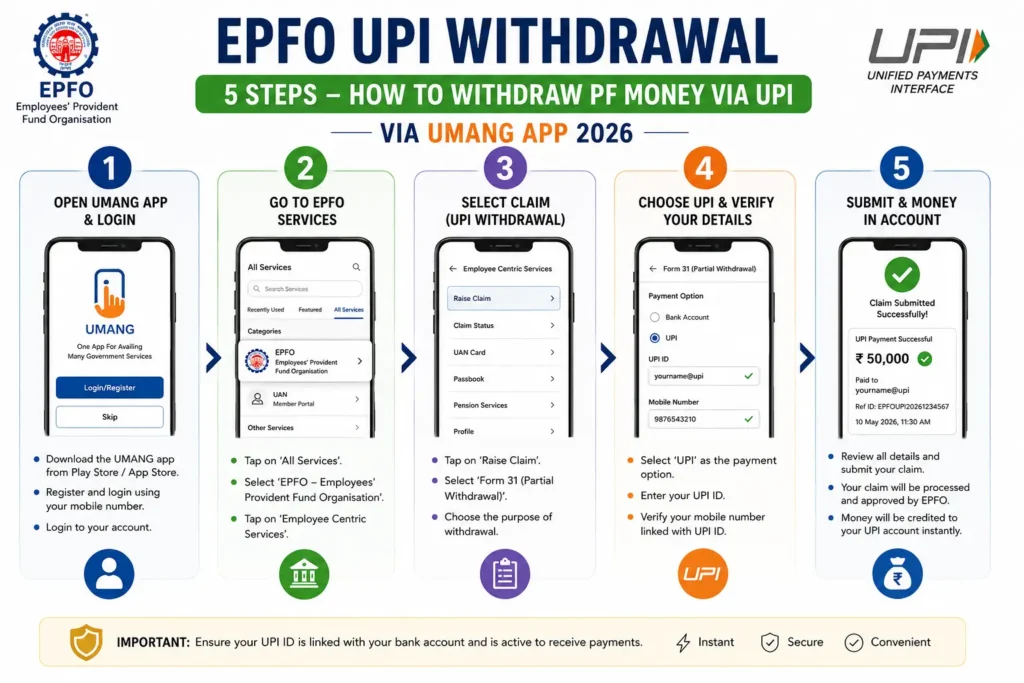
Step 1 — Login to EPFO Member Portal or UMANG App
Go to https://unifiedportal-mem.epfindia.gov.in and login with your UAN number and password. Alternatively, open the UMANG app on your phone and login with your EPFO credentials.
Step 2 — Go to Online Claims Section
Once logged in, navigate to the “Online Services” section. Click on “Claim (Form-31, 19, 10C & 10D)” depending on what type of withdrawal you are doing:
- Form 19 — Final PF settlement (after leaving a job)
- Form 31 — Advance/partial withdrawal
- Form 10C — Pension withdrawal
Step 3 — Verify Your Bank Account and KYC
The system will show you the bank account linked to your UAN. Verify it is correct. This is the account where your money will arrive. If there is any mismatch, fix it before proceeding.
Step 4 — Select UPI as Payment Method and Enter UPI ID
This is the new step that EPFO 3.0 is adding. When the feature goes live, you will see a UPI payment option. Select it. Enter your UPI ID (like yourname@okaxis, yourname@paytm, yourname@ybl etc.). Make sure this UPI ID is linked to the same bank account that is registered with your UAN.
Step 5 — Submit Claim and Receive Money
Submit the claim. Authenticate via Aadhaar OTP (your Aadhaar-linked mobile number will receive the OTP). Once the claim is auto-approved — which should happen within a few hours under EPFO 3.0 — the money will be credited directly to your bank account via UPI.
That is it. Five steps. No waiting for days. No calling the helpline. No checking the portal every morning.
Who Is Eligible for EPFO 3.0 UPI Withdrawal?
Not everybody can use EPFO UPI withdrawal right away. There are some basic eligibility conditions:
- You must be a salaried employee working in an organisation with 20 or more employees
- Your employer must be registered under the EPF Act, 1952
- You must have an active UAN (Universal Account Number)
- Your UAN must be fully KYC-compliant — Aadhaar linked, PAN linked, and bank account verified
- Your Aadhaar-linked mobile number must be active (needed for OTP authentication)
- Monthly salary should be up to ₹15,000 for mandatory EPF coverage. If you earn above ₹15,000, you can still be part of EPF voluntarily with employer consent
- You must be a resident of India and above 18 years of age
The most important condition here is KYC compliance. If your Aadhaar is not linked to your UAN, or your bank account is not verified in the EPFO system, the UPI withdrawal will not work for you.
This is why I keep saying — fix your KYC right now, before the launch. Do not wait.
Documents You Need Before Doing EPFO UPI Withdrawal
Preparing your documents in advance will save you a lot of headache when the EPFO 3.0 UPI withdrawal feature goes live. Here is what you need:
| Document | Purpose |
|---|---|
| UAN (Universal Account Number) | Must be active and KYC-verified |
| Aadhaar Card | Linked with UAN for OTP-based authentication |
| PAN Card | Required if withdrawing more than ₹50,000 within 5 years of service |
| Active Bank Account | Same account linked with your UAN |
| Aadhaar-linked Mobile Number | To receive OTP for verification |
| UPI ID | Linked to the same bank account as your UAN |
One thing that many people miss — your UPI ID must be linked to the exact same bank account that is registered with your UAN. If you use a different bank for UPI and a different one for EPF, the transfer may fail or get rejected.
How Much Money Can You Withdraw via EPFO UPI?
This is a important question and the answer might surprise you a little bit.
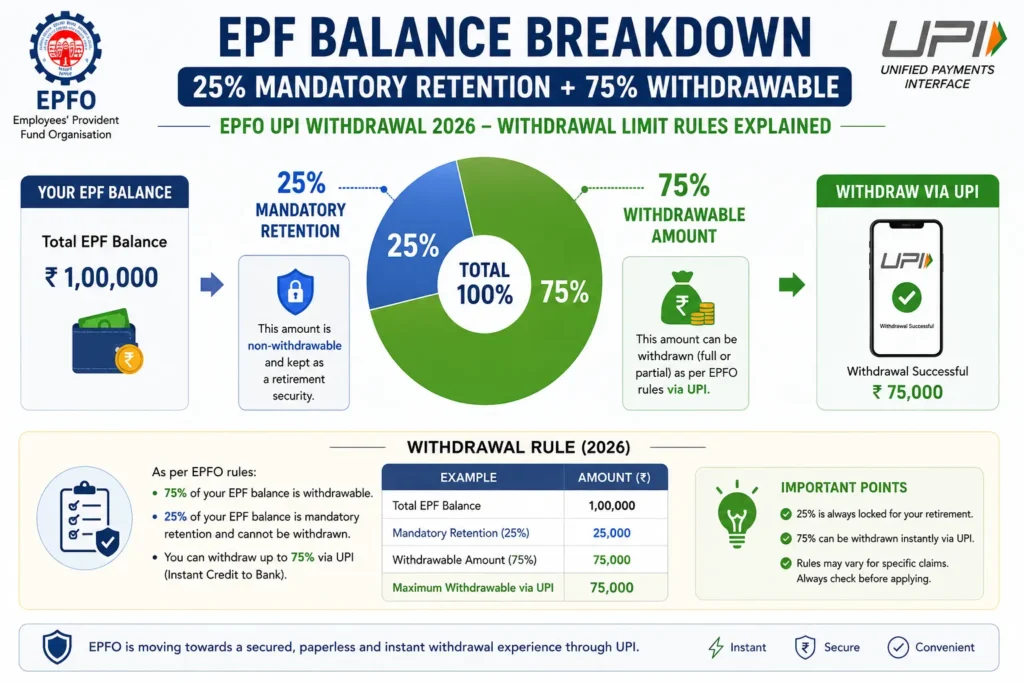
Under EPFO 3.0 rules, digital withdrawals via UPI and ATM are restricted to 50% of your eligible advance amount. And at all times, a minimum of 25% of your total EPF contribution must remain in the account — it cannot be withdrawn digitally.
So if your total EPF balance is ₹5 lakh, and you are eligible for an advance:
- Minimum 25% (₹1.25 lakh) stays in the account always
- Of the remaining ₹3.75 lakh eligible amount, you can withdraw up to 50% via UPI in a single transaction
For job loss situations specifically, a member can withdraw up to 75% of the total balance immediately through the new system, while 25% stays invested.
These limits are there to prevent people from completely draining their retirement savings impulsively. And honestly, I think that is a fair protection. The EPF is supposed to be your retirement fund — not an emergency current account.
How to Prepare Your Account Right Now for EPFO 3.0 UPI Withdrawal
The EPFO 3.0 UPI withdrawal feature may not be 100% live yet everywhere in India — but you can and should prepare your account right now so you are ready the moment it launches.
Here is exactly what to do today:
Step 1 — Activate Your UAN If you have never activated your UAN, do it now at https://unifiedportal-mem.epfindia.gov.in/memberinterface/
Step 2 — Link and Verify Aadhaar with UAN Login to your EPFO member portal. Go to KYC section. Link your Aadhaar number. Make sure the name, date of birth, and other details match exactly. Even a small spelling difference can cause problems.
Step 3 — Link and Verify PAN In the same KYC section, add and verify your PAN card. This is mandatory for withdrawals above ₹50,000 within 5 years of service.
Step 4 — Verify Your Bank Account Make sure your bank account (with correct IFSC) is verified in the EPFO portal. The bank account verification no longer requires employer approval for most members — 1.59 crore members have already done this self-verification this year.
Step 5 — Download and Setup UMANG App Download the UMANG app from Play Store or App Store. Login with your Aadhaar-linked mobile number. Link your EPFO account. The QR code feature for UPI-based ATM withdrawals will be available here once EPFO 3.0 fully launches.
Step 6 — Keep Your Aadhaar-Linked Mobile Number Active Your Aadhaar-linked mobile number is needed for OTP-based “Face Authentication” during UPI withdrawals. If your number has changed, update it at your nearest Aadhaar Seva Kendra before the launch.
Common Problems and How to Avoid Them
Even with the new EPFO UPI withdrawal system, there are some common problems that can cause your claim to fail. Here is what to watch out for:
Problem 1 — KYC Mismatch If your name in the EPFO system does not exactly match the name on your Aadhaar, the OTP verification will fail and your withdrawal will be rejected. Fix name discrepancies before attempting any withdrawal.
Problem 2 — UPI ID Linked to a Different Bank Your UPI ID must be linked to the same bank account registered with your UAN. Many people have multiple UPI IDs on different apps linked to different accounts. Double check this.
Problem 3 — Inactive UAN If you changed jobs and your new employer used a different UAN or you never activated the UAN, your old PF balances may be inaccessible. Transfer all old accounts to your current UAN via the EPFO online transfer facility.
Problem 4 — Employer Not Yet Updated in EPFO System If you recently left a job, your previous employer should have updated your exit date in the EPFO portal. Without this, certain types of final withdrawals may not process automatically. Follow up with your ex-employer’s HR team if needed.
Problem 5 — Mobile Number Not Registered or Inactive OTP for Aadhaar verification is sent to your Aadhaar-linked mobile. If that number is inactive or ported to a new SIM that has not been updated on Aadhaar — you will not receive the OTP. Fix this at the nearest Aadhaar Seva Kendra.
EPFO 3.0 UPI Withdrawal vs Old PF Withdrawal — Real Difference
Let me put this side by side so you can see exactly how much better the new system is:
| Factor | Old PF Withdrawal | EPFO UPI Withdrawal (New) |
|---|---|---|
| Time to receive money | 7 to 15 working days | Few hours to instant |
| Process | Manual verification by officer | Auto-approval by system |
| Employer approval needed | Often yes | No — digitally approved |
| Where to apply | EPFO portal or physical office | EPFO portal or UMANG app |
| Payment method | NEFT to bank account | UPI to bank account or ATM |
| Claim rejection risk | High (bank mismatch, document errors) | Lower (auto-verification) |
| Grievance resolution time | Weeks | Faster with real-time tracking |
The difference is massive. For someone facing a medical emergency or job loss, getting their PF money in hours instead of 15 days is not just convenient — it can be genuinely life-changing.
For the latest official updates on EPFO UPI withdrawal, always check the official EPFO website at https://www.epfindia.gov.in.
Also Read
- Top 10 Mutual Funds for SIP to Invest in 2026 — Brilliant Picks
- 7 Hidden Mutual Fund Fees That Are Secretly Destroying Your SIP Returns
- Top 5 Mutual Funds for SIP to Invest in 2026 — Proven Outstanding Picks
FAQ
Q1. What is EPFO 3.0 UPI withdrawal?
EPFO UPI withdrawal lets PF members withdraw money directly to their bank account via UPI, making the process much faster.
Q2. How does EPFO 3.0 UPI withdrawal work?
You submit a PF claim, choose UPI, verify with Aadhaar OTP, and receive money directly in your bank account.
Q3. Who can use EPFO 3.0 UPI withdrawal?
Members with complete KYC — Aadhaar, PAN, and bank account linked to UAN — can use this feature.
Q4. What is the withdrawal limit?
You may withdraw up to 50% of eligible advance amount, while 25% balance must remain in the EPF account.
Q5. Is Aadhaar mandatory for EPFO 3.0 UPI withdrawal?
Yes, Aadhaar linking and an active Aadhaar-linked mobile number are required.
Q6. Does EPFO 3.0 UPI withdrawal need employer approval?
Most claims under EPFO 3.0 are expected to work without employer approval.
Q7. How can I prepare for EPFO 3.0 UPI withdrawal?
Activate UAN, complete KYC, verify bank details, and install the UMANG app.
Q8. Where can I check withdrawal status?
You can track claim status on the EPFO Member Portal or UMANG app.
Note: EPFO UPI withdrawal is part of the EPFO 3.0 rollout which is still in phased implementation as of May 2026. Features and timelines may change. Always verify latest information at the official EPFO website: https://www.epfindia.gov.in.